
Quick answer: If 4K streaming shows a black screen, simplify the chain: connect the streamer directly to the TV, select the right HDMI port, try a suitable cable, and only then reconnect the receiver, soundbar, or switch. HDCP protects content as it travels over HDMI. For 4K or HDR, the source, TV, cable, and every device in between must work together. If you hear sound but see no picture, the HDMI/HDCP path is a strong suspect; with no picture or sound, also check the selected input, power, and source.
4K is a chain, not a single setting
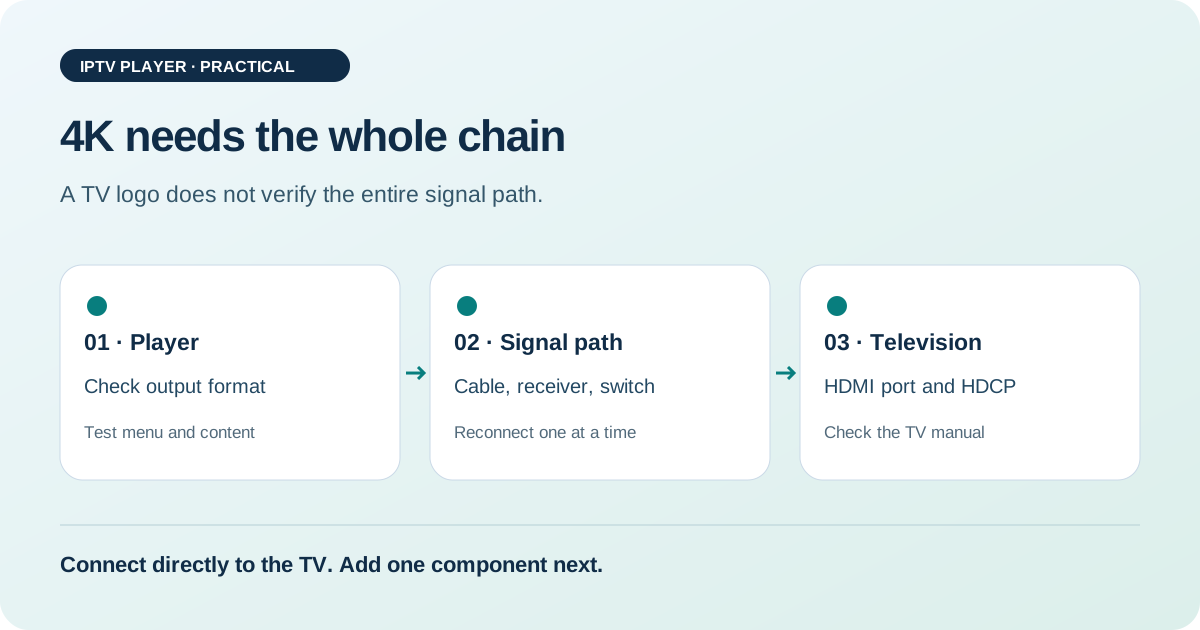
A streaming device produces the picture, an HDMI cable carries it, and the TV displays it. AV receivers, soundbars, HDMI switches, capture devices, or adapters may sit in between. For a 4K or HDR stream, every device must handle the requested combination of resolution, frame rate, colour space, and copy protection. A TV with a 4K panel can still show a black screen if its selected port or an intermediate device does not accept the handshake.
Netflix states the practical rule clearly: every device must support the quality you want, including cables and ports. You can use this rule to diagnose other protected streaming sources too. It is not a guarantee for every service; providers, titles, and device profiles can differ.
What HDCP means when the screen is black
HDCP stands for High-bandwidth Digital Content Protection. Netflix describes HDCP as an encryption system for protected content, usually sent from a device to a TV over HDMI or DVI. The player and display negotiate whether playback is allowed over the connection. A problem with this check can block the picture even if the player still responds or audio continues.
HDCP is separate from your internet connection. A fast connection will not fix a failed copy-protection handshake. Likewise, a visible player menu does not prove that 4K playback works: menus may use a different signal profile from a protected film. First check an ordinary menu screen, then the exact content that triggers the problem.
Record the symptom before unplugging anything
| What you observe | First check | What the result suggests |
|---|---|---|
| Menu visible, film is black | HDCP and compare another title | The protected playback path is suspect. |
| Audio continues, picture is black | Direct HDMI and another port | The video handshake may be failing. |
| No menu or audio | TV input and power | The source or selected input may be wrong. |
| Picture disappears when HDR starts | Temporarily disable HDR | A format change or intermediate device may be involved. |
Note whether the picture goes black immediately, flickers briefly, or disappears only when playback starts. A short blackout while switching may indicate a new handshake. If the screen stays blank, compare a setup with fewer devices.
A direct test separates possible causes
- Turn off the player and TV. Select the HDMI input you intend to use on the TV.
- Temporarily remove the receiver, soundbar, switch, and adapters from the video path. Connect the player directly to the TV with an HDMI cable.
- Fully start the TV, then start the player. Wait for the menu to appear.
- Start the same 4K title. Change nothing else and check whether picture and sound stay stable.
- If the direct test works, reconnect exactly one intermediate device. Repeat the title test.
For a black screen, Netflix recommends, among other things, bypassing receivers or sound systems, trying another HDMI port, and testing another HDMI cable. The direct test follows this logic: it reduces the number of possible failure points and gives you a useful before-and-after comparison.
Check the cable and HDMI port one at a time
A cable may work for menus but fail at 4K/HDR because the higher data rate or a specific signal profile exposes its limit. For comparison, use a cable whose specifications cover the quality you want. For 4K or HDR, Netflix recommends Premium High Speed or Ultra High Speed HDMI cables. Look for clear certification rather than judging by colour or price.
Reconnect the cable at both ends and try the TV port intended for 4K or enhanced signals. Manufacturers use different names for these modes. ARC or eARC primarily describes audio return; that port is not automatically the best one for every 4K feature. Check the label and manual for your TV model. After changing ports, select the corresponding TV input as well.
If the picture appears with another cable and port, repeat the test using only the original cable. This can help distinguish a contact problem from a port or bandwidth limit. Use directional cables and adapters only as labelled. Check the plugs and fit rather than reversing their direction as a test.
Add the receiver, soundbar, and switch back into the chain
A receiver is part of the HDCP chain even if it is only being used for audio. It must pass through the video signal and support the copy-protection handshake with the source and TV. A soundbar with an HDMI input can play the same role. A switch or splitter adds another handshake. The direct test shows whether one of these devices is involved, but not which one.
Reconnect devices in the order you normally use them, one at a time: receiver first, then soundbar or switch. After each step, check the menu and the same stream. If the picture fails immediately after one step, check that device’s firmware, input selection, and stated 4K/HDCP support. A firmware update may help, but it is not a blanket explanation for every black screen.
Reset resolution, HDR, and frame rate in a controlled way
If the menu is visible, open the player’s video settings and note the resolution, frame rate, HDR mode, and colour output. Temporarily choose a simpler profile that the TV definitely supports. Start the title again. If the picture returns, one of the additional format requirements was involved. This does not yet identify which device is the limit; repeat the same comparison after the direct test and after reconnecting the intermediate hardware.
Avoid switching repeatedly between HDR modes during playback. Some TVs briefly lose signal while changing modes. After each setting change, wait for a stable menu and record what you changed. If only one title remains black, try a second title. Netflix notes that individual titles can be reported separately, so one-title failure should be assessed differently from a problem with every film.
How to read the test results
| Result | Likely area to investigate | Next step |
|---|---|---|
| Works directly, fails with receiver | Receiver or its cable path | Test the receiver on its own or use a direct TV connection. |
| Another port works | Port setting or connection | Check the port documentation; do not change the cable at the same time. |
| Another cable works | Cable, plug, or specification | Remove the faulty cable from the chain. |
| Nothing works, including the menu | Input, power, or player | Check the TV source and basic player operation. |
| Only one title stays black | Title- or app-specific issue | Try a second title and contact the service. |
A green result only means that the tested setup worked under those conditions. It does not guarantee compatibility with every resolution, HDR variant, or service. If a restart fixes the issue, still note which devices were involved. Repeated failures at startup may point to an unstable handshake; use a consistent power-on order or simplify the chain.
This is an editorial troubleshooting path, not a measured device or lab test. Menus, port labels, and supported formats vary by model. The specific HDCP and cable advice comes from the linked Netflix support pages; our editorial method is the order of comparison tests.
Is the picture back, but playback buffers? Check the connection with our speed test then follow our IPTV buffering guide.
FAQ: 4K black screen
Can a fast internet connection fix an HDCP error?
No. HDCP concerns protected transmission between the player and display. A speed test checks the network, not HDMI, the port, or copy protection.
Why does 1080p work while 4K stays black?
4K may place higher demands on the cable, port, frame rate, HDR, and intermediate devices. Test directly on the TV and check whether every component supports the requested profile.
Why might another HDMI port help?
TVs may equip ports differently or save settings per input. Another port may allow the handshake to succeed. Then check the manufacturer’s port documentation.
What does a black screen with sound mean?
It points to a possible problem in the video path, such as the cable, port, or HDCP. Netflix recommends restarting, connecting directly, and comparing a different port and cable.
When is the streaming service at fault?
If several cables and ports and a direct connection work with other titles, but one title still fails, a title- or app-specific problem is plausible. Report it to the service and keep your test notes.
Sources and review date
Sources checked on 25 October 2026. Editorial guidance; no original device measurements.